← Back to VICEFREE PREVIEW
L&B PLUGINS · DADHOUSE x L&B AUDIO WORKS
VICE
Shimmer reverb: from dry to heaven in one knob
User Guide · version 1.0.3
Standalone plugin for Akai MPC · MPC OS 3.10.1 or later · Built with Akai's official MPC Plugin SDK
1. What VICE is
VICE is a shimmer reverb insert effect: a lush 8-line reverb that pitches its own tail up and feeds it back in, so every note leaves a glowing halo behind it.
On top of the classic shimmer it adds in-key chord shimmer, a tempo-locked reverse swell, ducking, a gated 80s mode, Tape and 12-bit eras, Freeze, and a dub-style Throw you can play live.
What is new in version 1.0.3
- 1.0.3: protection against "denormal" CPU spikes as reverb and echo tails fade out, so VICE stays light on the MPC. Your projects and presets keep working exactly as before.
Before you start you need:
• An Akai MPC that runs MPC OS 3.10.1 or later in standalone mode.
• A USB stick, SD card or the MPC's internal drive.
• VICE is an EFFECT plugin (it processes audio on an insert).
2. Install it (one time)
- Unzip the download
On your computer, unzip the file you downloaded. Inside you will find a folder called Dudi - VST - VICE, plus INSTALL.txt, README.md and this guide. - Make a VST2 Plugins folder
Plug a USB stick or SD card into your computer (or use the MPC's internal drive in Computer Mode). At the very top level of that drive, create a folder named exactly VST2 Plugins (capital V, S, T, P, with the space). If it is already there, use it. - Copy the plugin folder in
Copy the whole Dudi - VST - VICE folder into VST2 Plugins. Do not rename it and do not copy just the files inside. It must look like this:<drive>/VST2 Plugins/Dudi - VST - VICE/plugin.json - Update the MPC if needed
On the MPC, press Menu, tap Preferences, then the Info tab (or About) and check the version. It must be 3.10.1 or later. If it is older, update the MPC first with the official Akai updater. - Switch on external plugins
On the MPC: Menu > Preferences > Enhancements (Beta). Turn on Enable Enhancements, then turn on External Plugin Support. Until both are on, the plugin stays hidden. - Plug in the drive
Put the USB stick or SD card in the MPC. If the plugin does not show up, restart the MPC with the drive plugged in.
3. Load it on the MPC
- Open the Channel Mixer
Press Menu and tap Channel Mixer (or press Mixer). Choose the track, program, pad, submix or return you want to put VICE on. - Pick an empty insert
Tap an empty Insert slot. - Choose VICE
In the effect browser open External Plugins and tap VICE. Double-tap the insert to open its screen. - Turn up Amount
Play your track and turn the big Amount knob on MAIN. That's it. - Send/return use
On a return or submix, turn Kill Dry on (SPACE page) so VICE outputs reverb only.
The MPC does not send MIDI notes to effect plugins, so Throw and Freeze are played from a Q-Link or recorded as automation.
4. Quick start
- Load a preset: they are grouped VOX, KEYS, SNR, PAD, FX, THROW, SEND and BEAT.
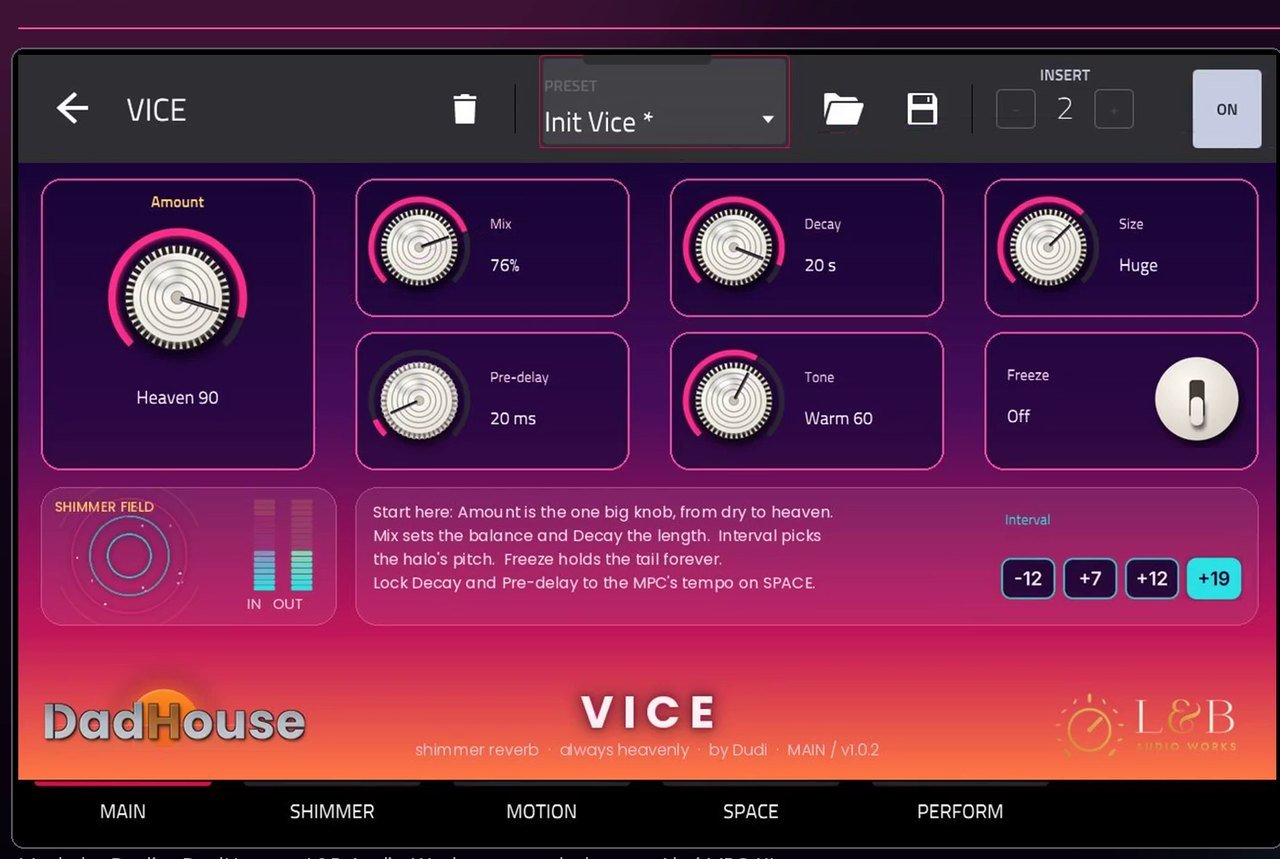
- Turn Amount on MAIN: it raises mix, length and halo together, so it always stays musical.
- Pick an Interval for the halo: -12, +7, +12 (classic shimmer) or +19.
- On SHIMMER, set Key and Scale and try Pitch Mode In-Key Chord.
- Flip Freeze to hold the tail forever as an instant pad.
5. Every page and control
MAIN page. Everything you need most of the time. The meters show input and output.
END OF PREVIEW
Get the full VICE guide
The complete guide comes with VICE on your private download page:
- All 5 plugin pages and every control explained, with screenshots
- Presets and recipes
- Troubleshooting and updates
$2.99 once, every future update and new version free for life.
Get VICE · $2.99Secure checkout by Stripe · instant download